Case #102623
As soon as I reboot the board or use the test function on the baldrick board, the pixels stay off
Current Issue
Pixels stay on when no signal is being sent from FPP. As soon as I reboot the board or use the test function on the baldrick board, the pixels stay off.
What have they tried?
Sending Off signeal from FPP. Schedilung a graceful stop. Scheduling an immdeiate stop.
Photos & Media
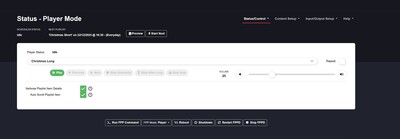
status.jpg
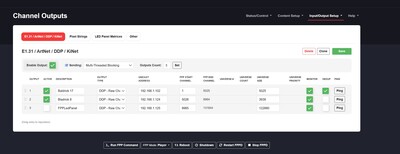
Outputs.jpg
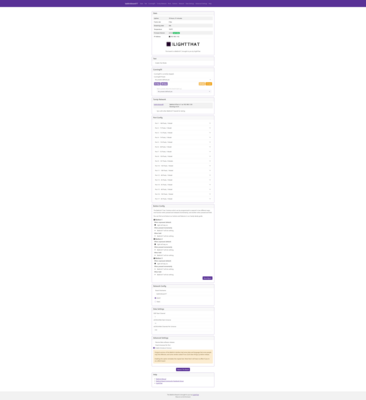
screencapture-192-168-0-164-proxy-192-168-1-102-2025-12-22-16_04_05.png
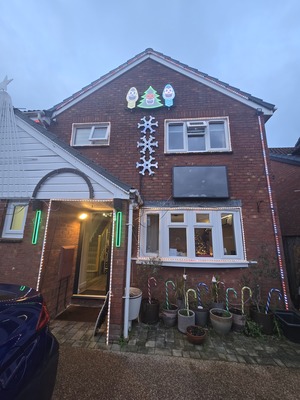
20251222_155446.jpg
Baldrick Board System State
{"ram_available":54172,"ram_minimum":32292,"ram_largest_block":40960,"uptime":38641,"oom_count":0,"host_comms":{"comms_state":[32]},"board_manufacturer":"ILightThat","board_model":"Baldrick17","flags":5,"temperature":[20],"network":{"ethernet_available":true,"wifi_available":false,"ethernet":{"ip_address":"192.168.1.102","subnet_mask":"255.255.255.0","gateway":"192.168.1.1","dns":"8.8.8.8","connected":true}},"network_throughput":80,"fpp":[{"hostname":"FPPMaster","sw_version":"9.4","ip":"192.168.1.1","hardware":"Raspberry Pi 4 Model B Rev 1.5"},{"hostname":"FPPLedPanel","sw_version":"9.4","ip":"192.168.1.125","hardware":"Raspberry Pi 4 Model B Rev 1.4"}],"last_settings_update":2105450111,"ota":{"updatable":[{"current_firmware_version":"v3.5.4","current_factory_version":"v5.2.7","current_bootloader_checksum":"32ab0d624bb399dfd976b2158905546e","current_partition_checksum":"9c57a76ed996748ee7393a41df755985","available_firmware_version":"v3.5.4","available_factory_version":"v5.2.7","available_bootloader_checksum":"32ab0d624bb399dfd976b2158905546e","available_partition_checksum":"9c57a76ed996748ee7393a41df755985"},{"current_firmware_version":"v3.5.0","current_factory_version":"recovery_1.3","current_bootloader_checksum":"561b6496a66e02d22093130a0f3fd845","current_partition_checksum":"9c57a76ed996748ee7393a41df755985","available_firmware_version":"v3.5.0","available_factory_version":"recovery_1.3","available_bootloader_checksum":"561b6496a66e02d22093130a0f3fd845","available_partition_checksum":"9c57a76ed996748ee7393a41df755985"}]},"buddies":[{"hostname":"baldrickboard8","sw_version":"v3.5.4","ip":"192.168.1.124","type":"Baldrick 8 Port v1.1","num_pixel_ports":8,"num_relay_ports":0,"num_dmx_ports":0,"board_id":"004b12b1cbfc"}],"frame_rate":0,"streaming":{"ddp_sources":[],"ddp_dropped":0,"ddp_recvd":0,"sacn_sources":[],"sacn_dropped":0,"sacn_recvd":0,"artnet_sources":[],"artnet_dropped":0,"artnet_recvd":0},"fx_state":false,"fx_active":"","test_mode_active":false,"test_dmx_preset":0,"test_pattern":"off","test_ports":"|","test_target":"","test_brightness":0,"test_fixed_colours":"","test_sync_host":""}FPP Outputs State
{
	"channelOutputs": [
		{
			"type": "universes",
			"enabled": 1,
			"startChannel": 1,
			"timeout": 1000,
			"channelCount": -1,
			"universes": [
				{
					"deDuplicate": 1,
					"active": 1,
					"description": "Baldrick 17",
					"id": 11,
					"address": "192.168.1.102",
					"startChannel": 1,
					"priority": 0,
					"channelCount": 5025,
					"monitor": 1,
					"type": 4
				},
				{
					"deDuplicate": 0,
					"active": 1,
					"description": "Bladrick 8",
					"id": 2,
					"address": "192.168.1.124",
					"startChannel": 5026,
					"priority": 0,
					"channelCount": 3939,
					"monitor": 1,
					"type": 4
				},
				{
					"deDuplicate": 0,
					"active": 0,
					"description": "FPPLedPanel",
					"id": 4,
					"address": "192.168.1.125",
					"startChannel": 8965,
					"priority": 0,
					"channelCount": 122880,
					"monitor": 1,
					"type": 4
				}
			],
			"interface": "eth0"
		}
	]
}
Support Team Updates
Dom Hodgson
December 22, 2025 at 04:11 PM
Hi Paul, Sometimes pixels will stick to the last data signal they receive, there are two ways of fixing this. If you are using FPP, then go to FPP settings > UI > Switch to Advanced Level UI then go to Playback and tick Blank between sequences [ ] this will make sure that off is being sent to all pixels in between sequences. You can also do the same using Baldrick Directly by creating a CunningFX of a colour splash which is just blank and setting that to automatically start when the Baldrick boots up.
Affected Boards
Case Details
Paul Taylor
8/10
I don't even turn my show off to change pixels
Monday, December 22, 2025
at 04:06 PM
System Information
v3.5.4
9.4
Windows
Possible Solutions

ChatBotDom suggests
Wrong pixels are lighting up when played from FPP
Normally this indicates that something has changed on the layout but FPP hasn't been updated, if you can re-render the sequence then save, then FPP Connect and make sure UDP Out is set to ALL.
Wrong pixels are lighting up when played from xLights
Normally this indicates that something has changed on the layout but the controllers hasn't been updated, if you can re-render the sequence then save, then go to the controllers tab in xLights and click Upload Outputs to the relevant controller.
Port not working
If a port isn't working, try swapping the phoenix connector from a working port to that port then enabling test mode selecting ALL 750 pixels per port.
normally this is a pigtail which hasn't quite being screwed in enough or that port hasn't been configured with pixels in xLights so go to the controller and click Upload Outputs