Case #371888
Hi guys: Summary: I have a show running 4x Baldrick 8 v1.1's. They were purchased from Alan @ Hanson at 2 different times this year (Aug & Nov) and...
Current Issue
Hi guys: Summary: I have a show running 4x Baldrick 8 v1.1's. They were purchased from Alan @ Hanson at 2 different times this year (Aug & Nov) and are clearly different batches. Aside from this minor issue, they have been bullet proof. The most problematic board is the "roof" board ("Controller 2" / "Roof", 192.168.1.16)- Baldrick 8 screen shots are from this board. Symptom: Main problem: Seed pixels fail to start up correctly. Half of the string operates, the remainder remains offline. Reproducible with the Holidgical test. (Ive also noticed a large discrepancy between the temperature senors on the boards that I have verified with a calibrated thermometer (this is not a problem for operation, but an observation)).
What have they tried?
Troubleshooting: The boards that are connected to the seed pixels are all running v3.1. (It appears that other boards running V3.5.4 are not effected). On these boards, I have observed the "Stats" interface showing that 3.5.4 is available. When an update is commenced and "proceed" is selected, the update process hangs and will not update. After 20mins a refresh of the page returns stats back to showing 3.1. I have attempted to factory reset, but the same cycle occurs. Work around: Currently the 2x boards on v3.5.4 do not appear to have the seed start up bug only v3.1. To work around, a manual unplug > re plug in of the effected seed strings returns them to full operation until the board is powered down. Is there any way we can boot load 3.5.4 before I fall off the daym roof! :)
Photos & Media
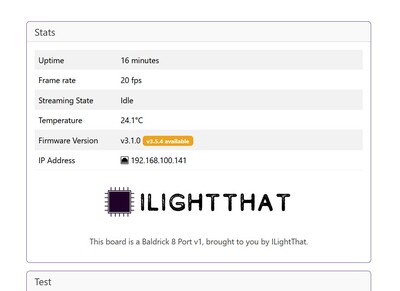
Firmware upload issue.jpg
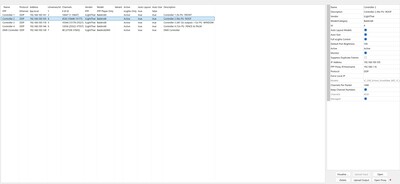
Xlights controller layout.jpg
Baldrick Board System State
{"board_manufacturer":"ILightThat","board_model":"Baldrick 8 Port v1","hostname":"Controller2","flags":1,"uptime":241,"temperature":[56.4375],"fpp":[{"hostname":"FPP","sw_version":"9.3-4-g97360ca2","ip":"192.168.100.1","hardware":"Raspberry Pi 4 Model B Rev 1.1"}],"network_throughput":91568,"network":{"ethernet_available":true,"wifi_available":false,"ethernet":{"ip_address":"192.168.100.105","subnet_mask":"255.255.255.0","gateway":"192.168.100.1","dns":"192.168.1.131","connected":true}},"ota":{"current_firmware_version":"v3.1.0","current_factory_version":"v5.2.3","current_bootloader_checksum":"32ab0d624bb399dfd976b2158905546e","current_partition_checksum":"9c57a76ed996748ee7393a41df755985","available_firmware_version":"v3.5.4","available_factory_version":"v5.2.7","available_bootloader_checksum":"32ab0d624bb399dfd976b2158905546e","available_partition_checksum":"9c57a76ed996748ee7393a41df755985"},"frame_rate":20,"test_mode_active":false,"test_dmx_preset":0,"test_pattern":"off","test_ports":"","test_target":"","test_brightness":0,"test_fixed_colours":"","test_sync_host":"","ddp_sources":["192.168.100.1"],"ddp_dropped":0,"ddp_recvd":400,"sacn_sources":[],"sacn_dropped":0,"sacn_recvd":0,"artnet_sources":[],"artnet_dropped":0,"artnet_recvd":0,"fx_state":false,"fx_active":"","network":{"ethernet_available":true,"wifi_available":false,"ethernet":{"ip_address":"192.168.100.105","subnet_mask":"255.255.255.0","gateway":"192.168.100.1","dns":"192.168.1.131","connected":true}},"buddies":[{"hostname":"Controller1","sw_version":"v3.1.0","ip":"192.168.100.141","type":"Baldrick 8 Port v1","num_pixel_ports":8,"num_relay_ports":0,"num_dmx_ports":0,"board_id":"3c8a1f33ade0"},{"hostname":"Controller3","sw_version":"v3.5.4","ip":"192.168.100.118","type":"Baldrick 8 Port v1.1","num_pixel_ports":8,"num_relay_ports":0,"num_dmx_ports":0,"board_id":"c0cdd6006528"},{"hostname":"DMX","sw_version":"v3.5.4","ip":"192.168.100.138","type":"BaldrickDMX","num_pixel_ports":0,"num_relay_ports":0,"num_dmx_ports":1,"board_id":"3c8a1f29bc58"},{"hostname":"Controller4","sw_version":"v3.5.4","ip":"192.168.100.146","type":"Baldrick 8 Port v1.1","num_pixel_ports":8,"num_relay_ports":0,"num_dmx_ports":0,"board_id":"c0cdd6006288"}],"last_settings_update":2151404199,"ram_available":110228,"ram_minimum":94976,"ram_largest_block":102400}FPP Outputs State
channelOutputs
0
channelCount	-1
enabled	1
interface	"eth0"
startChannel	1
timeout	1000
type	"universes"
universes
0
active	1
address	"192.168.100.141"
channelCount	10647
deDuplicate	0
description	"Controller 1"
id	3
monitor	1
priority	0
startChannel	1
type	4
1
active	1
address	"192.168.100.105"
channelCount	4530
deDuplicate	0
description	"Controller 2"
id	4
monitor	1
priority	0
startChannel	10648
type	4
2
active	1
address	"192.168.100.118"
channelCount	10344
deDuplicate	0
description	"Controller 3"
id	5
monitor	1
priority	0
startChannel	15178
type	4
3
active	1
address	"192.168.100.146"
channelCount	12036
deDuplicate	0
description	"Controller 4"
id	6
monitor	1
priority	0
startChannel	25522
type	4
4
active	1
address	"192.168.100.138"
channelCount	48
deDuplicate	0
description	"DMX Controller"
id	7
monitor	1
priority	0
startChannel	37558
type	4
Support Team Updates
Dom
December 21, 2025 at 12:21 AM
Hey Tristan, At the moment we don't have a way of boot loading 3.5.4 if those boards have no internet connection, I'm afraid for now you need to be careful on the daym roof!
Affected Boards
Case Details
Tristan Chaney
8/10
I don't even turn my show off to change pixels
Thursday, December 18, 2025
at 01:35 AM
System Information
3.1
9.3-4-g97360ca2
Ver 2025.13 64Bit
Windows
Possible Solutions

ChatBotDom suggests
My board says System update available
Feel free to click update, There are two different types of update available, one is for the firmware and one is for the system that updates the firmware, the latter rarely gets updated so we try not to make a big deal about it, unless it's urgent.
Unable to connect to board
Whilst this might be out of my power to solve, double check that the power cables are thick enough for the controller, that the ethernet is going to a router or switch. (The Baldrick won't work connected directly to the computer if it doesn't have a DCHP server).
If that doesn't work swap out the ethernet cables are those things can be finicky, take a look at the ethernet power, both lights green and orange should be flashing.
Wrong pixels are lighting up when played from xLights
Normally this indicates that something has changed on the layout but the controllers hasn't been updated, if you can re-render the sequence then save, then go to the controllers tab in xLights and click Upload Outputs to the relevant controller.