Case #754902
BALS asked me to submit this for you. I've had 2 input8 fail and your showing a short on both so to rule out my setup ill gog threw it here. Meanwell...
Current Issue
BALS asked me to submit this for you. I've had 2 input8 fail and your showing a short on both so to rule out my setup ill gog threw it here. Meanwell power supply 12v supply goes to the board and joined from the board to the LIGHT power input The button input is with 3 wire pigtails sent to the buttons and the ground negative is SPLIT between the SWITCH and the LED supply. The LED lamp power then goes to the lamp this leaves the other wire going to the switch please see attached diagram. Ethernet wise one port goes to a pi the other goes to my network switch its a bog stanard switch powering my falcon and currently pi with zero issues. buttons and powersupply all from BALS
Solution
We were unable to diagnose this issue so we replaced the board for the user and the show is now running correctly.
Photos & Media
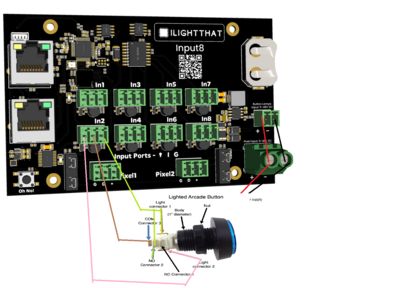
input8png.png
Affected Boards
Case Details
Nicolas Raimo
9/10
TBG wishes he had my show
Monday, December 15, 2025
at 02:13 PM
Friday, December 19, 2025
at 06:26 PM
System Information
0
Windows
Possible Solutions

ChatBotDom suggests
Unable to connect to board
Whilst this might be out of my power to solve, double check that the power cables are thick enough for the controller, that the ethernet is going to a router or switch. (The Baldrick won't work connected directly to the computer if it doesn't have a DCHP server).
If that doesn't work swap out the ethernet cables are those things can be finicky, take a look at the ethernet power, both lights green and orange should be flashing.
Wrong pixels are lighting up when played from xLights
Normally this indicates that something has changed on the layout but the controllers hasn't been updated, if you can re-render the sequence then save, then go to the controllers tab in xLights and click Upload Outputs to the relevant controller.
Wrong pixels are lighting up when played from FPP
Normally this indicates that something has changed on the layout but FPP hasn't been updated, if you can re-render the sequence then save, then FPP Connect and make sure UDP Out is set to ALL.